
Top Tips: Photographing Garden Birds
Observe and Set Up
The key to photographing birds is understanding their patterns, behaviours and strategically setting up your shots. Spend time watching the birds in your garden, by observing their movements and perching spots, to identify prime photography locations. You can even encourage their presence by placing a bird feeder nearby.
Be sure to also consider the background when choosing your shooting location. A large aperture with vivid spring foliage can create a beautiful bokeh effect, elevating your bird portrait into something spectacular. Introduce natural perches like fallen branches or use bird bath for more dynamic shots in front of suitable backgrounds. And like all photography, light is everything so make the most of early morning and late afternoon sunlight.
 © Gamander López | Sony α1 + FE 70-200mm f/2.8 GM OSS II | 1/2500s @ f/2.8, ISO 2500
Camera Choices
While any Sony camera can capture garden birds, certain models offer distinct advantages. Most cameras feature Bird Eye AF – detecting and tracking a bird's eye, making focusing incredibly easy. Newer Alpha cameras with AI Autofocus, such as the Alpha 7R V and Alpha 6700, provide enhanced Bird Subject Recognition for challenging tracking scenarios.
When Bird Recognition is combined with the 61-million-pixel resolution of the Alpha 7R V, you can create shots full of detail with plenty of resolution for cropping. For ultimate performance, the Sony Alpha 1 II combines AI Subject Recognition with a 50.1-megapixel sensor and a 30fps shooting rate. Alternatively, the Alpha 9 III offers AI recognition with a 24-megapixel sensor and an exceptional 120fps for capturing fleeting moments.
 © Olle Nilsson | Sony α1 II + FE 300mm f/2.8 GM OSS + 1.4x Teleconverter | 1/3200s @ f/4.0, ISO 3200
Lenses
A telephoto lens is necessary for garden bird photography. The ideal focal length depends on the bird's size, your garden's dimensions, and your camera's resolution. A higher resolution camera will enable you to crop the image more, making the bird appear larger within the shot.
Sony full-frame users can activate APS-C crop mode (Menu > Shooting > Image Quality > APS-C S35 Shooting > On) to make birds appear larger in the frame without needing super-telephoto lenses. This extends your lens's reach by 1.5x and saves time when editing.
Sony offers excellent telephoto zoom lenses for bird photography. The FE 400-800mm f/6.3-8 G OSS provides significant reach at good value. The celebrated FE 200-600mm f/5.6-6.3 G OSS is suitable for most gardens, while the FE 100-400mm f/4.5-5.6 G Master OSS delivers exceptional image quality and is compatible with teleconverters.
For beginners seeking versatility, the FE 70-300mm f/4.5-5.6 G OSS is a solid all-round choice. Finally, APS-C camera users, like the Alpha 6700, can use any of the full-frame lenses with a 1.5x crop or consider the E 70-350mm f/4.5-6.3 G OSS, offering a 105-525mm equivalent on a full-frame camera.
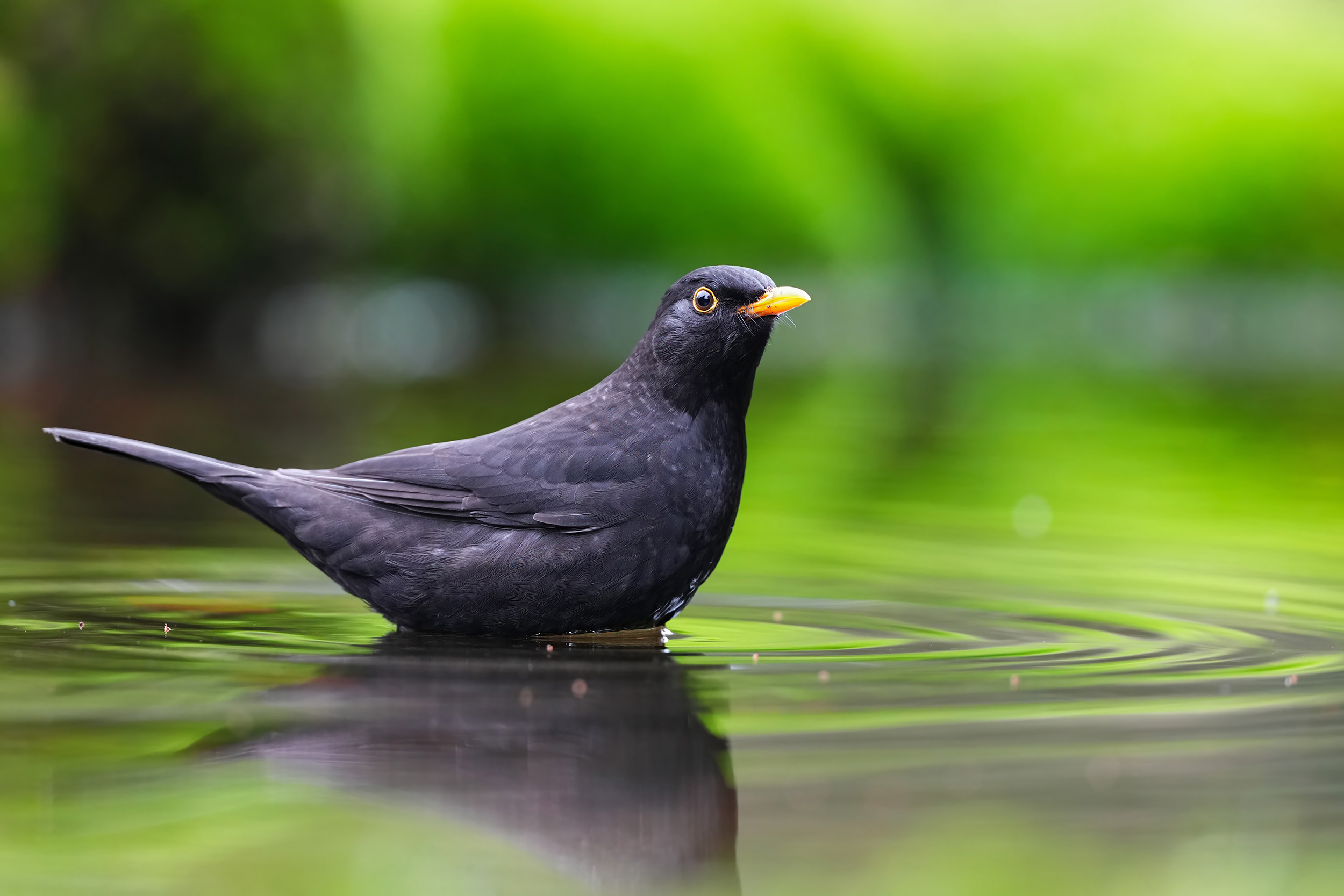 © Gustav Kiburg | Sony α1 + FE 300mm f/2.8 GM OSS + 1.4x Teleconverter | 1/80s @ f/4.0, ISO 2500
Camera Settings - Autofocus
Set the Focus Mode to Continuous Autofocus (AF-C) and the Focus Area to Tracking with Expanded Spot for tracking bird movements. Using Expanded Spot will help the focus track potentially fast or erratic movements from birds. Then set Bird as your subject recognition. To do this, go to Menu > Focus > Face/Eye AF > Face/Eye Subject and select Bird, or Menu > Focus > Subject Recognition > Recognition Target > Bird if you're using a camera with Sony's AI chip.
Set Tracking Sensitivity to 3 for photographing perched or larger birds, or 5 (faster) for smaller or flying birds.
 © Petar Sabol | Sony α1 + FE 300mm f/2.8 GM OSS II | 1/4000s @ f/2.8, ISO 640
Exposure
Bird photography is a challenging art that requires optimum concentration to get good shots. To focus on capturing shots, let the camera manage technical aspects. Set the aperture to be fully open and then set the ISO to AUTO with a minimum shutter speed (Menu > Exposure > ISO AUTO Min. SS). Your minimum shutter speed will depend on whether you're photographing perched birds or birds in flight. For perched subjects, shooting as slowly as 1/500th sec may suffice with SteadyShot turned on, but for birds in flight, use at least 1/2000th or 1/4000th sec.
Use Multi Metering exposure mode, and adjust the exposure compensation as needed. These settings should enable you to use the Hi+ Continuous Shooting Rate of your camera while focusing and exposure are automatically managed.
 © Gamander López | Sony α1 + FE 70-200mm f/2.8 GM OSS II | 1/4000s @ f/2.8, ISO 640
Memory Recall
One of the most useful features of Sony Alpha cameras is the ability to save camera settings and recall them quickly. After configuring your preferred AF, exposure, and colour settings for bird photography, save them via the Camera Set Memory option in the Shooting Menu by choosing a memory bank. You can then quickly switch between different saved settings by using the Mode dial. For example, if you're photographing perched birds, you can rapidly change to your saved settings for photographing birds in flight.
 © Gustav Kiburg | Sony α9 + FE 200-600mm f/5.6-6.3 G OSS | 1/400s @ f/6.3, ISO 640
Summary
- Observe- Monitor birds in your garden and note where they regularly perch for potential photo opportunities.
- Golden Hours- Shoot during early morning and late afternoon when birds are most active and light is softest.
- Background Control- Position yourself to ensure clean, non-distracting backgrounds behind your subject.
- Bird AF- Set your camera to Bird Recognition or Bird Eye AF to keep your shots perfectly in focus.
- APS-C Mode- Activate APS-C crop mode on full-frame cameras for 1.5x extra reach without changing lenses.
- Fast Shutter- Use at least 1/2000th sec for birds in flight and 1/500th sec for perched birds.
- Aperture- Shoot with your aperture wide open to create pleasing background blur that makes birds stand out.
- Auto ISO- Set ISO to AUTO with appropriate minimum shutter speed to let the camera handle changing light.
- Memory Recall- Save your bird photography settings to quickly switch between perched and flight configurations.


